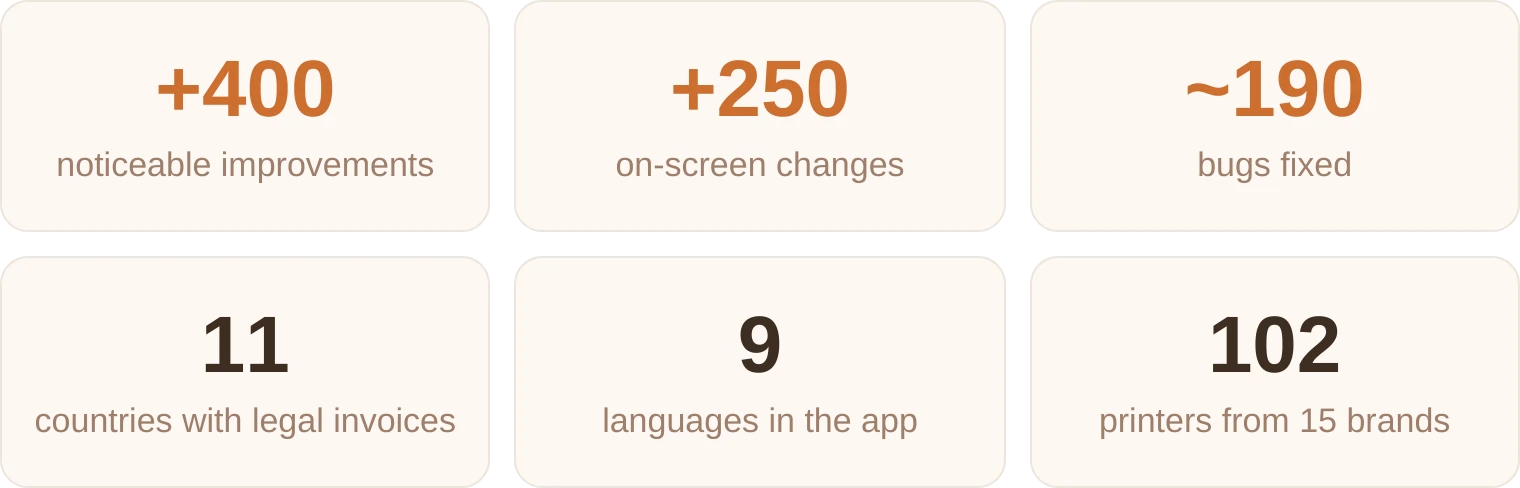
Since mid-September we've released 41 updates to BolloPrint. Some are big, important changes. Others are small improvements that make your day-to-day more comfortable. Here are the highlights.
Let's start with the best part: what changes how you work
1. The local agent, now with no container know-how needed
We know Docker can be complicated. So now it's easier. Install the agent on what you already have: your NAS, your workshop computer or your Home Assistant.

| Where | How to install it |
|---|---|
| Synology and QNAP | Download the package for your NAS and install it manually from its package centre. |
| Windows | An installer for your workshop computer. |
| Home Assistant | The «Add to Home Assistant» button and you're done. |
| TrueNAS | Paste the configuration we give you into its apps. |
Then open its page and click «Link with BolloPrint»: the workshop owner confirms it with one click, no codes to copy. Like every agent, it updates itself. Docker and Kubernetes keep working as always.
You'll find it under Settings → Printers → Local agent → «New agent». How to install the agent
2. Your printers, better seen and better counted
- Live camera and a final photo of every print in its history.
- Every print tells you everything: how long it took compared with the estimate, each spool with its AMS slot, and the name of the MakerWorld design with its link.
- What was really used: a failed or cancelled print is no longer counted in full, and resin prints record their millilitres.
- Bambu Lab, through the cloud without a password (your email and a code, and the session renews itself) and over your local network with pause, resume and cancel from BolloPrint, with Developer Mode turned on.
- Add by IP is now a wizard for each brand; you no longer need to know which «protocol» your machine speaks.
- The local agent updates itself, never in the middle of a print, and each printer brand improves on its own.
- Anycubic (Kobra 3, S1, 4 and X) and Creality with its factory firmware (K1, K2, Ender-3 V3 and Hi) join in, in beta.
3. Smart Migration
Bring in customers, designs, pieces, products, orders, quotes and stock from the folders and spreadsheets on your computer. BolloPrint reads what you bring and suggests how it fits; you review it before anything goes in, and if you make a mistake, it can be undone.
It's three steps: Prepare · Understand · Migrate. From the Pro plan, in desktop Chrome or Edge. On Max and Business, if you'd rather, we'll do it for you.
4. Legal invoices straight from the order
Issue the invoice for an order without leaving BolloPrint: with its numbering, its tax and your logo. Before issuing it you see the invoice exactly as it will come out, and if something is missing we tell you what and where to fix it.
- Payments: pending, overdue or paid, and a ZIP with all your invoices.
- VAT-free sales to EU businesses, with the legal wording included and the number checked in VIES.
- German e-invoices, Swiss QR-bills and invoices in another currency.
Already available in 11 countries: Austria, Cyprus, Czechia, Germany, Ireland, Luxembourg, the Netherlands, Poland (via KSeF), Sweden, Switzerland and the United Kingdom.
Not yet in Spain: it will arrive once we've integrated VeriFactu, and we'll let you know.
See the countries with invoicing
5. More professional quotes
- The quote PDF is shaped like an invoice: number, date, validity and, on paid plans, your own logo.
- Numbering by year («2026-00001») with no gaps, even if you delete one.
- Discount in € or %, shown as one more line.
- Customer records as Individual or Company, and simpler tax details.
- An order is created automatically when the quote is accepted.
6. A completely new Finance
Six tabs where you can see your income, your expenses, your taxes and your profit for whatever period you like (monthly, quarterly, yearly…).
Upload your expenses with our AI agent and file your suppliers' invoices to see what you spend your money on at a glance. Keep track of the taxes you have to pay each period.
The best part: export this data for your accountant in a ZIP with a single click.
7. «Notices»: your workshop's problems at a glance
A printer stopped with an error, a disconnected Etsy shop, a payment that didn't go through, storage almost full… We only tell you about what really needs something, and each notice closes itself once you fix it.
You can snooze a notice for a few days or for good. Red ones, which stop something important, are only shown in red to whoever can fix them; the rest of the team sees them with a «Let the workshop owner know».
8. Export your inventory, to Excel or PDF
You can now get a list of what's in your storeroom: stock, filaments, resins, supplies…
| Format | What you get |
|---|---|
| Excel | A workbook with a summary and one sheet per section, with filters, totals and anything out of stock in red. |
| One document per section, with your logo, photos of your pieces and the colours of each spool. |
On every plan, and always with all the rows, not just the ones on your screen.
9. In your language and your way
BolloPrint now speaks Polish, Dutch and Czech. That makes nine languages in total.
Dates and amounts are written the way they are in your workshop's country, on screen, in the PDF and in emails.
And there's a new Home that starts with what's urgent, with «Create new» for an order, a quote or a quick create, and «First steps» with its progress bar.
And there's more, because small changes make a difference too
| Where | What changes |
|---|---|
| Screens | While something loads you see its shape, never a fake empty list; if it fails, a «Retry». Filters are the same in every list, on mobile too. |
| Uploads | Each file shows its progress and retries by itself after a network drop. Sliced files can be up to 5 GB. |
| Costs | 29 filament families and 9 resin families, with updated prices per kilo; margins, with a coloured bar and an example. |
| Customers | The list searches and sorts by any column, and a customer with no alias shows their full name. |
| Etsy | Importing a listing is up to 8 times faster, orders with two variations come in, and before syncing a listing you see, value by value, what's going to change. Settings → Marketplaces is now a gallery, with one page per shop. |
| Shipping | Carriers and sales channels of their own for Austria, Germany, the United Kingdom, Poland, Czechia and the Netherlands. |
| Manual and blog | The manual grows from 49 to 70 pages, in all nine languages, and there are six new blog articles: from the local agent to what a piece really costs. |
| Day to day | The app copes better with peaks, comes back by itself after a network drop, Chrome's translator no longer breaks it, and a printer whose agent shuts down mid-print no longer leaves ghost prints. |
Where we are
| What | Where and how much |
|---|---|
| 🧾 Legal invoices in 11 countries | Austria · Cyprus · Czechia · Germany · Ireland · Luxembourg · Netherlands · Poland · Sweden · Switzerland · United Kingdom |
| 🌍 A workshop can be opened from 53 European countries | With its currency, its taxes and its carriers. Pay in euros, pounds, złoty or Czech koruna. |
| 🖨️ 102 printer models, filament and resin | Bambu Lab · Prusa · Elegoo · FlashForge · Anycubic · Creality · QIDI · Snapmaker · Voron · RatRig · Sovol · Artillery · Longer · Phrozen · Two Trees |
| ✅ 10 tested by us on real machines | Bambu Lab A1, A2L, P1P, P1S, P2S, X1 Carbon, X2D, H2C, H2D and H2S. |
Is something missing?
Tell us at info@bolloprint.com or on our Discord channel. We read everything. A lot of what you see here came from messages like yours.
If you want more detail on how it works, it's all in the manual.
And we're not stopping: we keep working every day to make BolloPrint the best tool for your 3D printing workshop.